iPhone & iPad
VPN for iPhone and iPad
The bibiVPN app on the App Store: one tap and your traffic is encrypted. Email sign-in, 7 European countries, the first 24 hours free.
24 hours free · Not in your App Store? See below how to switch your region.
What bibiVPN does
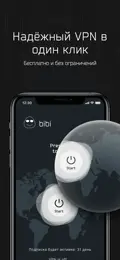
One big button in the app — your traffic is encrypted and your IP address hidden.
Germany, the Netherlands, Finland, Poland, Austria, the UK and France. We pick a server for you, or choose a country.
No password: we email you a code. One email on all your devices.
One-off payment for the term you need — nothing renews on its own.
On the site — SBP, SberPay or a card. Payments by YooKassa, we never see your card.
We’ll help you install and connect: @bibi_vpn_support.
How to install
2 minutes · App Store
Not in your App Store? Switch the region — 2 minutes
- 1Open your profile
In the App Store tap your avatar at the top right, then your name.
- 2Country or region
In “Account Settings” choose “Country/Region” and find “Kazakhstan”.
- 3Accept the terms
Tap “Continue”, then “Agree” to the App Store terms.
- 4Payment and address
Payment method — “None”. City — Almaty, your address and phone. Tap ✓ at the top.
- 5Find BiBi VPN
Go back to App Store search, find “BiBi VPN” and tap “Get”.
Region won’t change?
- You have an active subscription (iCloud+, Music, etc.) — cancel it and wait until it ends.
- There’s money left on your Apple balance — spend it down to zero.
- You’re in Family Sharing — leave the family group first.
- A pre-order or refund is still pending — wait until it completes.
Apple shows the reason right on the region change screen. Still stuck — message us, we’ll help.
Pricing
The first 24 hours are free. After that — a one-off payment for one device, no subscription or auto-renewal.
FAQ
Does it work on iPad?
Yes, the bibiVPN app on the App Store is for iPhone and iPad. Each device is paid separately.
I can’t find bibiVPN in the App Store — what now?
The app may not show up for a Russian Apple Account. Switch your account region with the step-by-step guide above — about 2 minutes. Still stuck? Message @bibi_vpn_support.
How do I pay with a Russian card?
On bibi.gg — with SBP, SberPay or a bank card. The days go to the account with the email you enter — sign in to the app with it.
Is it free?
The first 24 hours after your first connection are free, once per app installation, no card needed. After that — from 149 ₽ a month per device.
Is it a subscription?
No. Every payment is one-off and nothing renews on its own. When the term ends, renew manually on the site, in the app or in the Telegram bot.
How many devices can I connect?
One payment — one device. Sign in with one email on all your devices and pay for each separately. Paid days can be moved between devices in your account.